
Jenny Mod iOS Download – The Honest Guide for iPhone and iPad Players (2026)
Let me tell you about the most common mistake iPhone players make when looking for Jenny Mod.
They search “Jenny Mod iOS download,” click the first result, download something labelled as a .apk file, try to open it on their iPhone — and nothing. The file refuses to open, throws a weird error, or disappears entirely. Frustrated, they try three more sites. Same result. Some end up on sketchy pages pushing ads or, worse, fake installer apps that do nothing except drain battery and harvest data.
Here is the truth nobody in those search results bothers to say clearly: you cannot install Jenny Mod Java Edition on an iPhone. Ever. No workaround. No trick. No jailbreak fixes it either, because a jailbreak won’t help Forge run on a mobile processor.
But iOS players can absolutely get Jenny Mod working through Minecraft Bedrock Edition. The experience is different from PC, but it is real, it works, and the install takes about ten minutes if you know exactly what you are doing.
This guide tells you exactly what you are doing.
What is Jenny Mod iOS and What Does It Actually Run On?
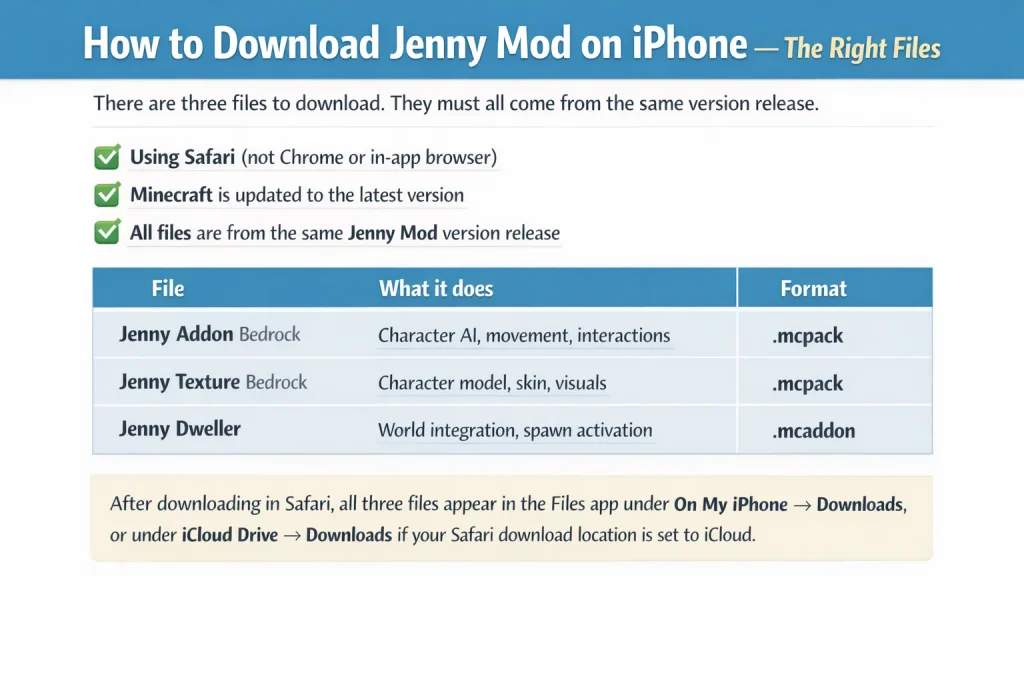
Jenny Mod for iOS is the Bedrock Edition addon version of the original mod, installed through Minecraft Pocket Edition on iPhone and iPad. It uses three files:
- Jenny Addon Bedrock .mcpack — the main behaviour and AI file
- Jenny Texture Bedrock .mcpack — the character model, skin, and visuals
- jenny-dweller .mcaddon — the world integration file that makes Jenny spawn
You cannot install .apk files on iOS. Any website claiming you can is either wrong or dangerous. The correct formats are .mcpack and .mcaddon — Minecraft’s native addon formats, fully supported by Apple without any device modification.
Jenny Mod iOS vs Java PC — honest comparison
| Feature | iOS (Bedrock) | PC (Java Edition) |
| Platform | iPhone, iPad | Windows, Mac, Linux |
| File format | .mcpack + .mcaddon | .jar (Forge mod) |
| Jenny character | Yes | Yes |
| Trust / gift system | Yes | Yes (more detailed) |
| Full adult animations | Limited | Full |
| Custom interaction menus | Basic | Full |
| Multiplayer support | Yes (Bedrock) | Yes (Java servers) |
| Jailbreak needed | No | N/A |
| Cost | Free (Minecraft paid) | Free (Minecraft paid) |
Knowing this difference before you install saves a lot of confusion afterward.
Does Jenny Mod Work on iPhone Without Jailbreaking?
Yes, completely. No jailbreak involved or needed.
The Bedrock addon system is an officially supported feature of Minecraft that Apple permits on the App Store. The .mcaddon and .mcpack files work through Minecraft’s own import system — built into the app itself. Apple has no issue with it. Your device has no issue with it.
The only thing that can go wrong is downloading the wrong file from an untrustworthy source.
What You Need Before You Start
Check all four requirements before downloading anything:
| Requirement | Minimum | Recommended |
| iOS version | iOS 13 | iOS 16 or above |
| Device | iPhone 6s / iPad 5th gen | iPhone 12 or newer |
| Minecraft version | Bedrock 1.17.0 | Bedrock 1.21 (latest) |
| Minecraft source | App Store only | App Store only |
| Free storage | 150 MB | 500 MB |
| Jailbreak required | No | No |
| Age requirement | 18+ only | 18+ only |
That last point is worth saying clearly. Jenny Mod contains adult content. Every download on this site carries an 18+ disclaimer for that reason.
How to Download Jenny Mod on iPhone — The Right Files
There are three files to download. They must all come from the same version release. Mixing files from different versions causes import errors that look like the mod is broken when it is actually just mismatched.
Before downloading, confirm:
- You are using Safari (not Chrome or an in-app browser)
- Your Minecraft is updated to the latest version
- All three files are from the same Jenny Mod version release
| File | What it does | Format |
| Jenny Addon Bedrock | Character AI, movement, interactions | .mcpack |
| Jenny Texture Bedrock | Character model, skin, visuals | .mcpack |
| Jenny Dweller | World integration, spawn activation | .mcaddon |
After downloading in Safari, all three files appear in the Files app under On My iPhone → Downloads, or under iCloud Drive → Downloads if your Safari download location is set to iCloud.
How to Install Jenny Mod on iPhone — Step by Step
This is the section that matters most, and the one where competitors consistently give vague or incorrect instructions. Follow these steps in order — skipping any step causes silent failures that are hard to diagnose.
| Step | Action | What to expect |
| 1 | Update Minecraft in the App Store | Confirms compatibility before you start |
| 2 | Download all 3 files using Safari | Files save to the Files app automatically |
| 3 | Open Files app → On My iPhone → Downloads | All 3 files visible |
| 4 | Tap Jenny Addon .mcpack → open with Minecraft | “Import Successful” message appears |
| 5 | Tap Jenny Texture .mcpack → open with Minecraft | “Import Successful” message appears |
| 6 | Tap jenny-dweller .mcaddon → open with Minecraft | “Import Successful” message appears |
| 7 | Create new world → enable Experimental Gameplay | Critical — must be done before world creation |
| 8 | Activate Resource Pack + Behaviour Pack in world settings | Both packs must show as active |
| 9 | Enter world → find Jenny spawn egg in Creative inventory | Jenny Mod is now working |
Step 7 is where most players fail. You cannot enable Experimental Gameplay in an existing world. If you skip it during world creation, delete the world and start again — there is no other fix.
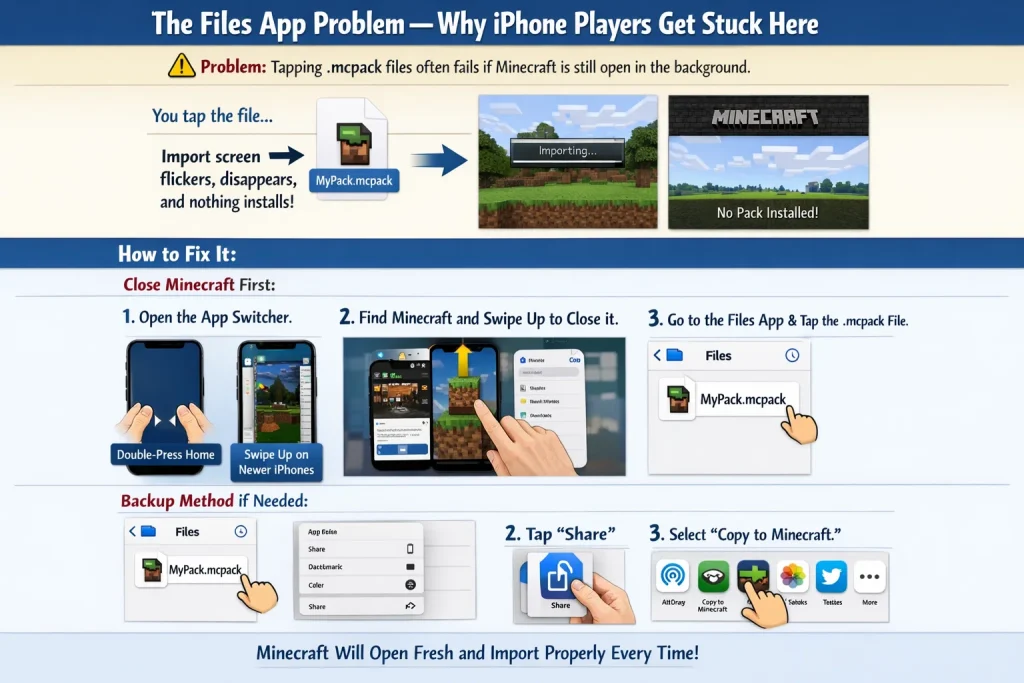
The Files App Problem — Why iPhone Players Get Stuck Here
This is the single most common failure point across every iOS install, and it is entirely avoidable.
Why it happens: When you tap a .mcpack file in the Files app, Minecraft must be completely closed — not minimised, not running in the background. If Minecraft is open, iOS sometimes fails to hand the file across properly. The import screen flickers and disappears, leaving no pack installed and no error message.
The fix:
- Double-press the Home button (or swipe up from the bottom on newer iPhones) to open the app switcher
- Find Minecraft and swipe it upward to fully close it
- Return to the Files app
- Tap the first .mcpack file
Minecraft will open fresh and import correctly every single time.
Backup method if tapping still does nothing:
- Long-press the file in the Files app
- Tap Share
- Select “Copy to Minecraft” from the share sheet
This forces the handoff directly and bypasses any file association issue.
Jenny Mod iOS vs Android — What Is Actually Different?
The files are identical on both platforms. Only the import process differs.
| Aspect | iOS | Android |
| File format | .mcpack + .mcaddon | .mcpack + .mcaddon |
| Import method | Files app → tap → open with Minecraft | File manager → tap → opens in Minecraft |
| Minecraft must be closed first | Yes — critical | Usually not required |
| Backup import method | Share sheet → Copy to Minecraft | Share → Minecraft |
| Direct .apk installs | Not supported | Supported |
| Sideloading | Not supported | Supported |
| In-game experience | Identical to Android | Identical to iOS |
| All Jenny features available | Yes | Yes |
Once inside the game, the Bedrock version of Jenny Mod behaves identically on both platforms. The character model, animations, trust system, and interaction mechanics are the same on iPhone, iPad, and Android.
Common Jenny Mod iOS Errors and How to Fix Them
| Error | Most likely cause | Fix |
| Import fails silently | Minecraft was open in background | Close Minecraft from app switcher, try again |
| “Import successful” but pack missing | Imported into wrong Minecraft profile | Delete and reinstall Minecraft, re-import all files |
| Jenny spawn egg missing in inventory | Experimental Gameplay not enabled | Delete world, create new one with Experimental Gameplay ON |
| Purple / pink texture squares | Texture pack not activated or wrong order | Deactivate both packs, re-activate texture first then behaviour |
| File not in Downloads folder | Safari saves to iCloud, not local storage | Open Settings → Safari → Downloads → change to On My iPhone |
| “No compatible app found” message | File association broken | Long-press → Share → Copy to Minecraft |
| Minecraft crashes after .mcaddon import | Conflicting addons or outdated Minecraft | Remove all other addons, update Minecraft, try again |
Frequently Asked Questions – Jenny Mod iOS
Can I get Jenny Mod on iPhone for free?
Does Jenny Mod iOS support multiplayer?
Will Jenny Mod damage my iPhone?
Why does my iPhone say it cannot open the file?
Is the iOS version the same as the Java PC version?
What Minecraft version should I use on iPhone?
Can I install Jenny Mod on iPad?
A Final Honest Note on iOS and Jenny Mod
Most guides you find on this topic either oversimplify the install process, get the iOS-specific steps wrong, or push you toward third-party installer apps you do not need. Some recommend App Store apps that offer “Jenny-themed” texture packs — those are legitimate cosmetic packs, but they are not Jenny Mod. No character AI. No trust system. No gifting mechanics.
The real Jenny Mod Bedrock addon installs through three files and nine steps. That is it.
- No third-party app required
- No jailbreak required
- No sketchy download page required
Download the files from this page, follow the steps above in order, and you will have Jenny Mod running on your iPhone in under ten minutes.
If you run into a problem not listed in the errors table above, the cause is almost always one of two things: a mismatched file version between the three files, or Minecraft being open during import. Both are one-minute fixes once you know what to look for.
Got a specific error that is not covered here? Drop it in the comments — we check them and respond with the exact fix.
About Author

Alex Carter
Minecraft Mod Researcher & Technical Writer
Alex has 6+ years of hands-on Minecraft modding experience on Android. Every guide he writes is based on a personal installation with real screenshots — no guesswork, no copy-paste. He scans every APK with VirusTotal before publishing.